Guides15 Oct 202612 min read
AI tools for ecommerce: images, video, and ads
AI tools for ecommerce that make product images, video, and ads: what each one does, what to check before you trust it, and how to run a low-risk pilot.


Key takeaways
- In Shopify's 2025 merchant survey of 500 established stores, three in four owners used AI tools. Among those users, content generation was the top use at 69%.
- Visual content is a big cost. One vendor's guide puts studio photography at $50 to $150 per finished image.
- Match the tool to the job. Photoroom and Shopify's Sidekick suit photo cleanup, Runway suits video, AdCreative.ai suits ad variants, and Adobe Firefly covers images and video with a commercial-use claim. Sloosh runs reusable workflows across all three.
- Accuracy is the real test. In one survey, 83% of shoppers said they would return an item that did not match its online image.
- Run a small pilot before you pay for a plan.
AI tools for ecommerce have moved from a novelty to a normal part of running a store. A few years ago, a product photo needed a camera, a set, and a day. Now a store owner can start from one phone picture and get a clean image and a short clip in minutes.
That speed brings a catch. The tools differ in what they do well and in how closely their output matches your real product. This guide sorts AI tools for ecommerce by the job they do, with a focus on images, video, and ads. It names what each tool's own site says it does and what to check, then ends with a simple test.

What are AI tools for ecommerce?
AI tools for ecommerce are software products that use AI to handle store jobs such as writing product copy, editing photos, making video, building ads, answering customers, and personalizing search. Most owners start with content. In Shopify's 2025 merchant survey, three in four owners used AI tools, and 69% of those users generated content.
Shopify states these figures on its AI in ecommerce page, and notes the survey covered 500 established merchants who had been on the platform for two or more years. The sample is not every store, and Shopify sells AI features, so read the numbers as a picture of active sellers, not the whole market.
The category is broad. inRiver's overview of AI for ecommerce lists product data enrichment, content localization, digital shelf analytics, dynamic pricing, and chatbots. Shopify's Sidekick assistant lists prompts for email campaigns and shipping audits. If you need customer support, search, email, or analytics tools, those guides are a better start.
This post covers the creative side: images, video, and ads. It is the part of AI tools for ecommerce where a small store can save the most time, and where mistakes are the easiest to see. Few AI tools for ecommerce are as easy to judge as a product photo, because you can compare it with the real item.
Why start with images, video, and ads?
Start with images, video, and ads because they cost the most to make by hand, and shoppers rely on them. In a 2026 roundup that Shopify cites, 61% of shoppers say product images and videos are the most important product page element when they complete a purchase. Visuals are also where AI saves real money.
The 61% figure comes from Salsify's 2026 research, as quoted in Shopify's video marketing statistics. Treat it as a pointer, since the roundup does not give the sample details.
Cost is the second reason. One vendor's October 2026 price guide, Omi's product photography cost breakdown, lists $50 to $150 per finished image from a studio. At six images per product, that is $300 to $900 for one item. Omi sells a competing service, so read it as a market range.
Accuracy is the third. In a 2023 survey of more than 1,000 US consumers, 83% said they would return a product if the online image did not match what they received. Nfinite ran the survey itself, so treat it as directional. Still, it explains why every tool below needs a human check.
Which AI tools for ecommerce make product images?
Photoroom and Shopify's Sidekick are built for store owners, Adobe Firefly is a general image tool with a commercial-use claim, and Sloosh offers listing-image workflows. These are the main AI tools for ecommerce that make product images. Each one needs a human check against the real product.
| Tool | What its site says | Good fit when | Check |
|---|---|---|---|
| Photoroom | AI product photography from one uploaded photo, product staging, and batch edits across thousands of images | You want product cleanup and staging at volume | Pricing and plan limits are not stated on the home page |
| Shopify Sidekick | A photo editor mode that turns phone photos into studio-style shots; included with your Shopify plan | You sell on Shopify and want edits inside your admin | Features and usage limits vary by plan |
| Adobe Firefly | Generates and edits images, with remove, extend, and upscale tools; Adobe calls its models commercially safe | You want a general image tool with stated training data | Partner models are third-party models |
| Sloosh | Spaces for listing images, such as a four-image Amazon pack | You want repeatable workflows for many products | Beta; credits per run depend on the plan |
Photoroom. Photoroom's site describes its AI Product Photography as a way to make studio-quality product visuals without a studio, starting from an uploaded product photo. It also offers Product Staging, which places a product in lifestyle scenes and seasonal settings, and Batch Edit, which runs edits across thousands of images through the web app or an API. The page invites you to start but does not say what the entry plan includes or costs.
Shopify Sidekick. Sidekick's page lists a photo editor mode that turns phone photos into studio-style shots, plus a writer mode for product descriptions. The page says Sidekick is included with your Shopify plan, and that features and usage limits vary by plan. It is a convenient choice if your store is already on Shopify.
Adobe Firefly. Firefly's page says its image editor can remove items, extend backgrounds, and upscale, and it says Adobe's Firefly models are commercially safe. Adobe states that the models are trained on licensed Adobe Stock content and public-domain content whose copyright has expired, and that it does not train on users' personal or generated content. It also lists partner models from other companies, which are third-party models.
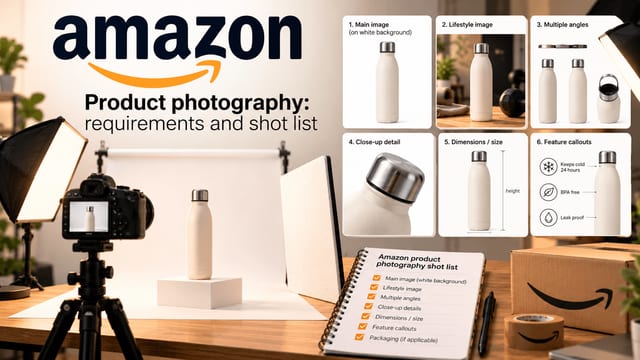
Sloosh. Sloosh is an AI creative studio for images and video, and it is in beta. In Studio, you pick a model and prompt it. Spaces are ready-made workflows behind a short form. For product images, the Amazon Listing Pack turns one photo into four square images, the White Background Product Studio replaces a messy backdrop with white, and Product Multi-Angle Shots makes five angles from one photo.
If all you need is a clean cutout on a handful of photos, a single-purpose editor is the shorter path. A workflow tool earns its place when you run the same job across many products.
Which AI tools for ecommerce make product video?
Runway and Adobe Firefly make video from prompts, and Sloosh turns a product photo into a short clip. These are the main AI tools for ecommerce that make product video. All of them need a human check, because a generated clip can drift from the real item.
Video matters for sales. Shopify's roundup cites HubSpot data that 49% of marketers named short-form video as the format with the highest ROI, and Wyzowl data that 82% of marketers say video has given them a good return. Both are marketer opinion surveys, not measured returns, and the roundup does not give the sample sizes.
Runway. Runway's site calls its Creative product an all-in-one, cloud-based platform for generating and editing video and images, with audio in the same workspace. It names Gen-4.5 as its video model. It also describes Runway Ads, which generates on-brand video and image ads and publishes them to ad platforms such as Meta and TikTok. The page does not make ecommerce-specific claims.
Adobe Firefly. Firefly's page says you can generate video clips from any idea, with flexible resolutions and aspect ratios, and refine a clip by describing changes. The same commercial-use and training-data statements apply as for images.
Sloosh. Two Spaces are relevant. Phone Photo to Studio Product Video turns a phone photo into a square studio image and a 5-second turntable video. Its page warns that the turntable "invents sides the photo does not show," so the back of the product may be inaccurate. The AI UGC Video Ad Creator takes 1 to 8 product photos and a creator portrait and makes a 4 to 15 second video in one of three aspect ratios. Check the portrait rights before you use it, because Sloosh says to upload only photos of products and people you have rights to use.
Honest take: for a product with a complex back or moving parts, AI-generated spins will guess. Shoot a real clip for any view buyers rely on.
Which AI tools for ecommerce make ads?
AdCreative.ai generates ad creatives and scores them, and Runway Ads generates and publishes video and image ads. Sloosh makes poster ads and UGC-style video ads from product photos. These are the main AI tools for ecommerce that make ads, and every output needs a real test before you spend on it.
Creative quality drives results, but the most-cited study is old. Nielsen's article says that in 2006, Project Apollo found that 65% of a brand's advertising sales lift came from the creative. The same article reports a 2017 study of nearly 500 FMCG campaigns, and says media's effect had grown to 36% from 15%. Use it as a benchmark for the idea that creative matters, not as a current figure.
AdCreative.ai. Its site says it can generate ad creatives and banners, video ads, and ad text, and that you can score creatives before advertising. It also offers A/B testing and competitor insights. The page makes large performance claims with no stated method, and we have not tested them. Run your own test.
Runway Ads. Runway's page says its ads product publishes to major ad platforms and tunes later rounds based on results. Check the current setup and fees on Runway's site.
Sloosh. The Product Poster Ad Creative Space makes one vertical 4:5 poster from a product photo and a short headline, and its page says to keep headlines under about eight words for reliable spelling. The page says a logo cannot be added in this version. For video ads, use the UGC Video Ad Creator above.
For any ad tool, the weak point is the same: a clean image still needs a clear offer, and AI cannot know your margins. Treat the tool as a way to make more drafts, then let a real test pick the winner.
How do you choose among AI tools for ecommerce?
Choose among AI tools for ecommerce by testing five things: accuracy to your real product, rights to use the output commercially, batch handling, a cost you can see before you run, and fit with where you already work. A tool that fails the first test is not worth the speed.
- Accuracy. Does the output match your product's color and logo? Put it next to the real item.
- Commercial use. Read the tool's terms. Adobe states its Firefly models are commercially safe. Sloosh's Space pages say outputs may be used commercially if you have the rights to what you upload. Check any other tool yourself.
- Batch. How many products can you run at once? Photoroom lists a batch tool for thousands of images. Sloosh runs batches on Pro and Max plans.
- Cost visibility. Can you see the price before you run? In Sloosh, the credit cost shows on the generate button, and credits for a failed generation come back.
- Where you work. Sidekick lives inside Shopify. Other tools are separate apps, so count the extra export and upload steps.
| Your situation | A sensible first test |
|---|---|
| Shopify store, phone photos, a few products | Sidekick or Photoroom for cleanup |
| Large catalog with one repeated look | A workflow tool such as a Sloosh Space, or Photoroom's batch tool |
| Short product video for ads | Runway or a Sloosh video Space |
| Many ad variants to test | AdCreative.ai or Runway Ads, with your own A/B test |
How do you test AI tools for ecommerce without wasting money?
Test AI tools for ecommerce with a small pilot, so a weak tool costs you an afternoon and not a year-long plan: pick five products, shoot one real photo of each, run the same set through two tools, and compare the results with the real items. Count how many images you can publish without edits. Then decide.
- Choose five products. Include one hard case, such as a shiny item or one with small text.
- Shoot one clean photo each. Use a white backdrop and window light. Good input matters more than the tool.
- Run the same set through two tools. Use the same photos and the same goal, such as a white-background main image and one lifestyle scene.
- Review against the real item. Check color, logo, shape, and fine print. Mark each image as ready or needs work.
- Track the outcome. After you publish, watch conversion and returns for those listings. Keep the tool only if the numbers hold.
Keep the pilot cheap. Many tools offer a trial. Sloosh gives new accounts 20 starter credits once.
How does Sloosh fit among AI tools for ecommerce?
Sloosh puts image and video models in one studio and lets you save a job as a reusable workflow. A Space runs behind a short form, and Studio is one prompt box. Among AI tools for ecommerce, it suits stores that repeat the same job, and it is not the shortest path for one quick edit.
Studio's blog guide lists image models such as Flux 2 Pro and Seedream 5 Pro and video models such as Kling V3 Omni and Seedance 2.0. Read how Studio works for the full controls, and Space vs Spacelab for the difference between running a workflow and building one.
Four facts matter for a buyer:
- Sloosh is in beta.
- Plans are paid. New accounts get 20 starter credits once. After that, you choose a plan, and the pricing page lists them.
- You see the credit cost before each run.
- An MCP server lets you generate from AI tools such as Claude and ChatGPT on Pro and Max plans, described in the Sloosh MCP guide. An API is coming soon.
What should you try first?
Start with the job that costs you the most time. For most stores, that is product images, so test AI tools for ecommerce there first. Shoot one clean photo of one product, run it through two tools, and compare the results with the real item. Keep the winner and repeat on four more products.
If you want to see a reusable image workflow, Sign up for Sloosh and run a product photo through the Amazon Listing Pack or the White Background Product Studio. Check every image against the real product before you publish.
Questions
- Which AI tools for ecommerce should I try first?
- It depends on the job. Photoroom and Shopify's Sidekick suit photo cleanup, Runway suits video, AdCreative.ai suits ad variants, and Sloosh suits repeatable image and video workflows. Test two tools on the same five products and compare the results with the real items before you commit.
- Are AI-generated product images safe to use?
- They can be, if you check them. The main risk is an image that does not match your real product, which can drive returns. Compare color, logo, shape, and fine print with the item, and confirm each tool's commercial-use terms before you publish.
- Can AI tools make product videos from a photo?
- Yes. Several tools describe video generation, including Runway and Sloosh. Be careful with spins and turntables, because the tool may invent sides the photo does not show. Sloosh's own page says so, so shoot a real clip for any view buyers rely on.
- Do I need a designer to use AI ad tools?
- Not to start. Tools such as AdCreative.ai and Sloosh's poster Space make drafts from a product photo. You still need a clear offer and a test plan. Run a small A/B test and let results, not the tool, pick the winner.
- How much do AI tools for ecommerce cost?
- It varies, and plans change. Some tools bill by credit, such as Sloosh, which shows the cost before each run. Others include features in a plan, such as Shopify's Sidekick. Check each tool's pricing page, and use trials or starter credits for your pilot.
- Can I use Sloosh outputs commercially?
- Sloosh's Space pages say you may use the output commercially, as long as you only upload photos of products and people you have the rights to use. Read the current terms of use before you publish, and check any marketplace rules for your listing.
Try it in Sloosh
Open the space from this post and run it on your own product.